

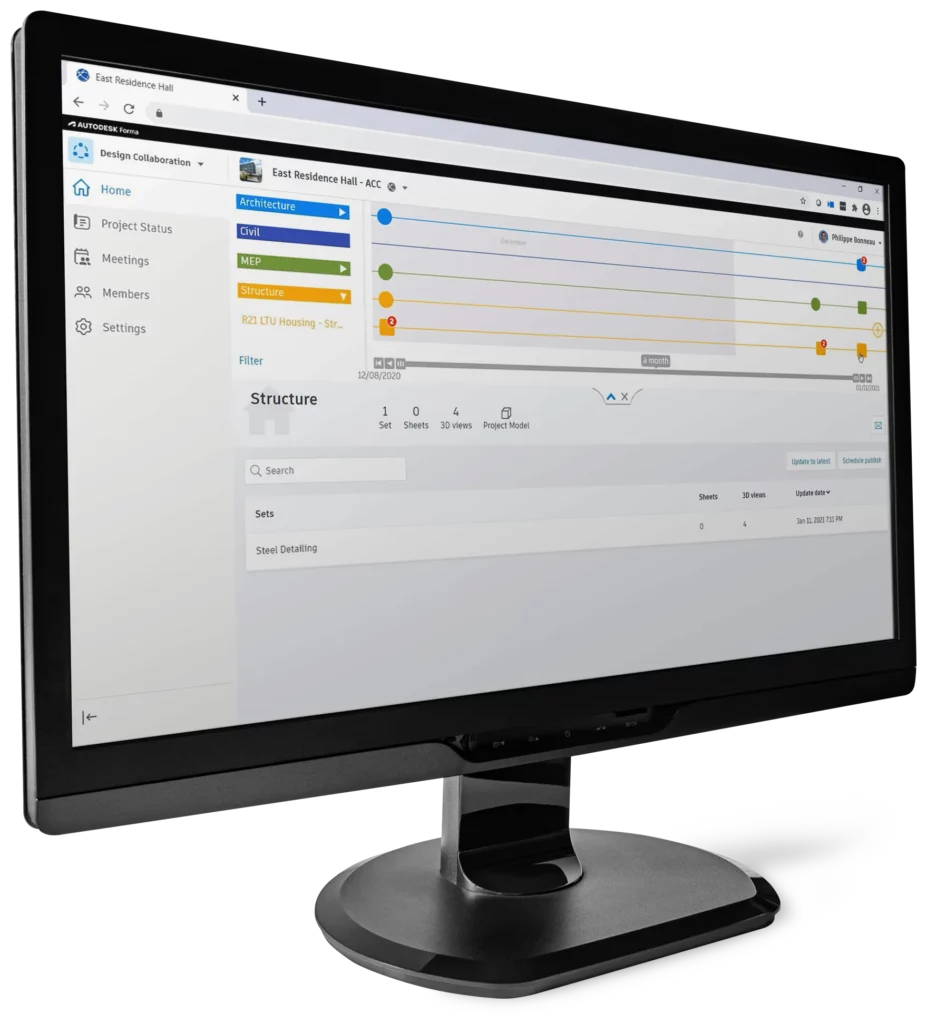
Forma Design Collaboration (formerly BIM Collaborate Pro) provides Architecture, Engineering, Construction and Operations (AECO) teams with a secure, cloud-based Common Data Environment (CDE) to manage projects from concept through to handover.
By centralising project information and standardising workflows, teams can improve coordination, reduce rework and deliver projects more efficiently along predictable timelines.
Work concurrently across architectural, structural, civil and MEP models within a shared digital environment. Eliminate version confusion and disconnected data by ensuring all stakeholders work from a single, trusted source of information.
Maintain control over project information with permission-based access, milestone tracking and formalised information exchanges. Keep work-in-progress, shared and published documentation clearly organised and compliant with BIM standards.
Track design revisions, monitor model updates and manage structured exchanges between disciplines. Built-in clash detection and issue tracking tools help minimise delays and costly redesigns.
Deliver validated, structured BIM data that transitions into operations and facilities management. Support long-term asset performance through digital twin readiness and accurate project information.
Collaborate across disciplines, manage project data with precision, and deliver verified BIM-ready models for digital handover.
Enhance teamwork through repeatable, cloud-based workflows that connect models, teams and data from early design to final delivery.
Gain clear visibility into design progress and critical milestones. Monitor updates, control information exchanges and ensure alignment across disciplines.

Move beyond static documentation by delivering structured asset data ready for facilities management and lifecycle planning.
Support process and plant design teams within a fully connected workspace.
With a connected Common Data Environment and structured BIM collaboration workflows, Forma Design Collaboration helps South African AEC teams reduce coordination risks, improve efficiency and deliver projects with greater certainty, from concept through to digital handover.
Publish, review and consume multidisciplinary design packages within a clear, time-stamped workflow. Teams can track who shared what and when, reducing uncertainty and preventing unexpected downstream changes.
This structured exchange process improves accountability, strengthens coordination and supports smoother BIM project delivery.
Identify spatial conflicts across aggregated architectural, structural, civil and MEP models before they become costly site issues.
Clashes are automatically converted into actionable issues, allowing teams to assign responsibility, resolve conflicts faster and maintain project momentum.
Monitor, compare and analyse model changes with precision. Use intelligent tracking tools and Watchgroups to receive automated alerts when specific elements are modified.
This enables faster, data-driven decisions and reduces the risk of overlooked revisions impacting construction or procurement.
Create, assign and resolve design issues within a unified cloud environment. Ensure clear ownership and accountability across disciplines.
Issues can be addressed directly within tools such as Revit or Navisworks, enabling seamless roundtrip workflows without disrupting productivity.
Keep all project communications organised within a connected workspace. Link emails and related correspondence directly to relevant project data for improved traceability and audit readiness.
This reduces information silos and ensures critical discussions are not lost across platforms.
Standardise delivery across projects using templates, enforced naming conventions, permission-based access and managed design assets.
Maintain consistency, strengthen BIM compliance and ensure teams operate within clearly defined governance frameworks.
Coordinate multidisciplinary models in a secure cloud environment, detect clashes early and work from a single source of truth.

Track design progress, control data exchanges and maintain structured workflows across project milestones.

Deliver asset-ready BIM data that supports digital twins, facilities management and long-term operations.
Enhance the value of Forma Design Collaboration with connected content management and digital twin tools. Improve design consistency, streamline workflows, and deliver high-quality handover data that supports long-term operations.
Autodesk Model Analytics Essentials provides near real-time Revit model health insights without opening Revit, helping teams monitor model performance, detect issues early, and improve BIM data quality. Available with a Forma Design Collaboration subscription.
Transform handover with digital twins using Tandem. Deliver, maintain and leverage digital twins to strengthen client trust while opening new service opportunities and driving revenue growth.
Centralise BIM content with cloud-based digital asset management. Access a secure library to manage, version and share trusted design assets across all projects, ensuring consistency and efficiency.
Aggregate models, detect clashes automatically and track issue resolution to strengthen project coordination.
Visualise and manage design changes. Compare versions, track modifications and stay informed with connected change tracking tools.
Centralise project files with version control, permissions and secure access to the latest project data.
Share, compare and coordinate design data in the cloud. Monitor package exchanges and visualise project updates across teams.
Plan meetings, assign actions and track design changes to improve collaboration, accountability and project traceability.
We develop data sharing solutions to improve and speed up the communication between CAD & business management technologies.
We do unique assessments of our clients, enabling them to address workflow challenges, identify opportunities & achieve objectives.
By understanding BIM philosophies we can develop & implement BIM solutions for any project or establish BIM standards for any company.
Speak to us about your operational requirements or outcomes and we'll tailor a solution best suited to your business.
Important: 64-bit browsers are recommended for optimal viewing experience.
The latest versions of the following browsers are recommended. Otherwise, browser versions that are no more than a year old are strongly advised for continued support.
Note: Internet Explorer 11 is not supported for use with Autodesk Forma products.
There are no desktop operating system requirements for Autodesk Forma products since they are web-based. Learn the requirements for the Autodesk Construction Cloud App.
When you are activating your account, you can select a data storage region which applies to that account. See the Regional Data Storage FAQ to learn about which Autodesk Forma products are supported by the data storage regions.
See the Forma Design Collaboration help to learn more about the Revit, Civil 3D, and Plant 3D versions supported with Forma Design Collaboration.
Revit Cloud Worksharing requires three times (3X) the total disk space consumed by equivalent RVT files for all cloud workshared projects accessed by the user.
Minimum: Internet connection able to deliver symmetrical 5 Mbps connection for each machine on burst transfers.
Value: Internet connection able to deliver symmetrical 10 Mbps connection for each machine on burst transfers.
Performance: Internet connection able to deliver symmetrical 25 Mbps connection for each machine on burst transfers.
Note: Since Forma Design Collaboration, Build, Data Management, Content Catalog, and Takeoff are web-based products, there are no specific hardware requirements. A stand-alone video card is recommended when using the Viewer, but RAM and CPU requirements depend on project size.