
When planning BIM models with the purpose of facilities management we need to pay particular attention to the unique identifiers of the elements. Using Revit as an example we could consider the two types of ID’s that are available. There is a short ID which is completely unsuitable for the unique identification of assets because it could very easily be the case that there are two elements from different models sharing the same value which can be confused within the facilities management platform.
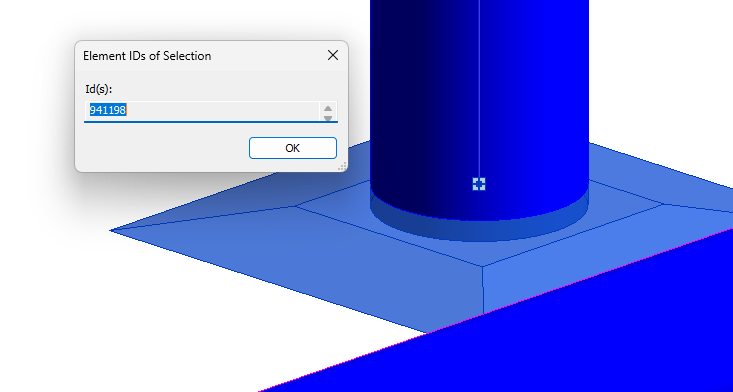
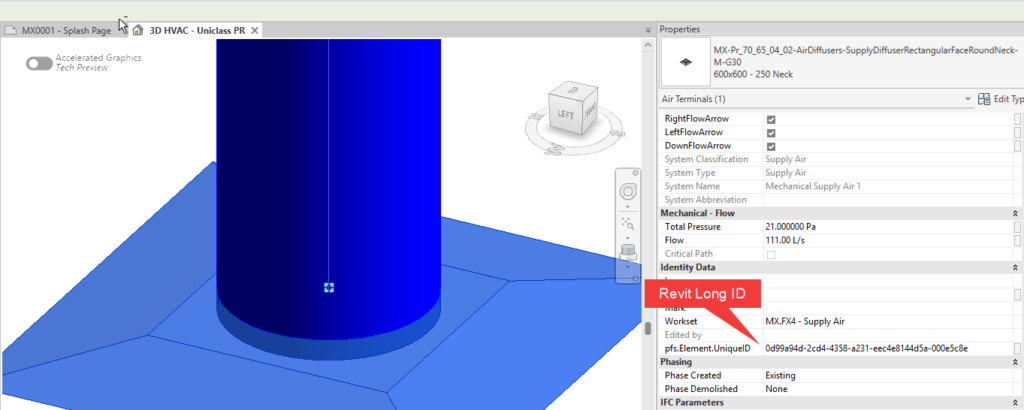
There is also a long ID (essentially a global unique identity) that can easily be exposed using Dynamo. This GUID can then be written to a shared parameter for the element. This is a common workflow whenever we want to record information against a Revit element.
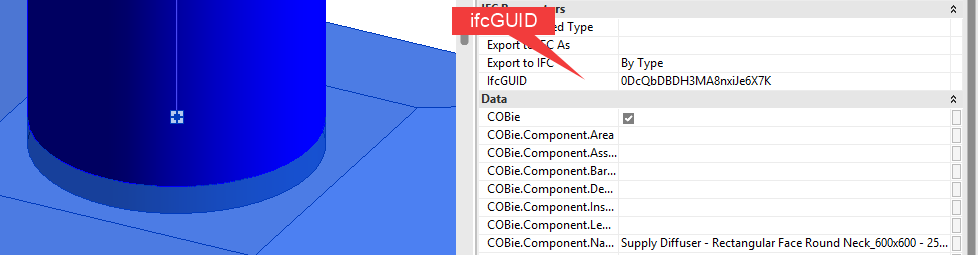
There is yet another ID that might be of interest. Built into Revit is an ifcGUID element parameter that is automatically assigned by Revit. “IFC” refers to “Industry Foundation Class” and is meant as a common exchange file format which different BIM authoring platforms can operate on. One software platform’s IFC model export will therefore share the same parameter name as another, which makes IFC export the preferred to references the ID.
The alternative to IFC would be Navisworks. Navisworks also assigns a unique identifier. However, it is generally accepted that IFC is more generic and incurs a smaller cost, all things considered.
I had a look at Autodesk Tandem, which seems to be able to map the IFC parameter onto the ID parameter of the facilities management platform.
If you need help adopting the AEC Collection or the Autodesk Construction Cloud in your practice or you are looking to invest in hardware, please contact Micrographics so that we may be of assistance.
If you need help adopting the AEC Collection or the Autodesk Construction Cloud in your practice or you are looking to invest in hardware, please contact Micrographics so that we may be of assistance.

