
Introduction
In the architecture, engineering, and construction (AEC) industry, the term BIM Manager is widely used, but not always clearly understood.
For many, it still conjures up the image of a highly skilled technician managing Revit models or resolving coordination issues. While that may have been true a decade ago, the role has evolved significantly.

Today, BIM Managers are no longer just responsible for models, they are responsible for how teams collaborate, how data is structured, and how information is trusted across entire projects.
This shift has been driven by increasing project complexity, distributed teams, and the rise of cloud-based platforms such as Autodesk Construction Cloud (ACC) and BIM Collaborate Pro.
In this blog, we explore:
- What a BIM Manager really is
- Why the role was created
- How it has evolved over time
- Why it is critical in modern cloud-based workflows
- And how Autodesk tools are enabling this transformation
What Is a BIM Manager?
At its core, a BIM Manager is responsible for managing digital building information across a project lifecycle.
This goes far beyond working in 3D.
Understanding BIM
BIM (Building Information Modeling) is not just about creating models: “It is about creating intelligent, data-rich representations of buildings that can be used by multiple disciplines, including architecture, structural engineering, and MEP services.”
Each discipline contributes to the same digital ecosystem.
Without structure, this quickly becomes chaotic.
The Role of the BIM Manager
A BIM Manager ensures that:
- Models are created consistently
- Data is structured correctly
- Teams can collaborate effectively
- Information can be trusted
In simple terms:
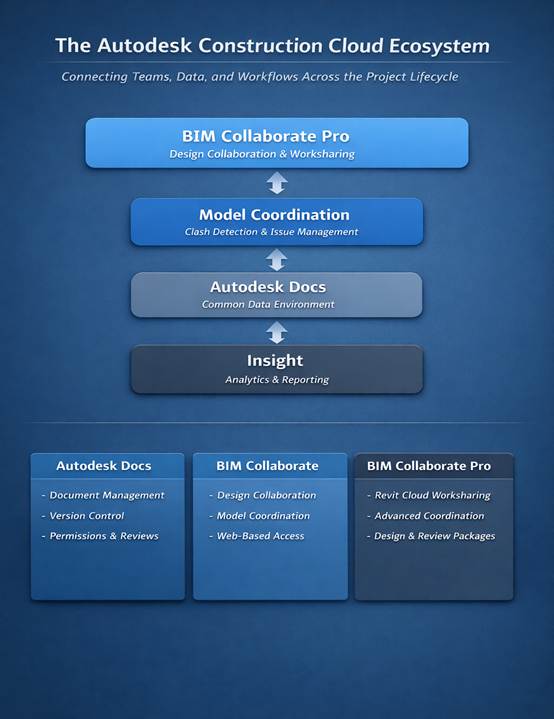
A BIM Manager connects people, processes, and technology.
Why Was the BIM Manager Role Created?
The BIM Manager role did not emerge because of software; it emerged because of complexity.
The Problem Before BIM Management
Before dedicated BIM roles existed, projects faced several recurring challenges:
- Teams working in isolation
- Conflicting drawings and models
- Files being overwritten or duplicated
- Lack of ownership and accountability
- Coordination issues discovered too late
As projects grew larger and more multidisciplinary, traditional methods of managing information became insufficient.

The Need for Structure
Software like Autodesk Revit introduced the ability for multiple users to work on a single model. However, this introduced new risks:
- Who owns which part of the model?
- Who can edit what?
- How are changes coordinated?
- How is model integrity maintained?
These are not IT problems; they are workflow and coordination challenges.
The Solution
The BIM Manager role was introduced to:
- Standardize workflows
- Define collaboration processes
- Manage access and permissions
- Ensure coordination across disciplines
In essence, the BIM Manager was created to prevent coordination chaos.
Why a BIM Manager Is Not Just IT or Administrative Support
A common misconception is that BIM management can be handled by IT departments, administrators, or general support staff.
This is not the case.
IT Departments
IT teams are responsible for:
- Hardware
- Networks
- Security
- System performance
However, they typically do not understand:
- Revit worksharing
- Model linking between disciplines
- Coordination workflows
- BIM-specific risks
Administrative Roles
Administrative staff excel at:
- Document control
- Communication
- Scheduling
But they are not trained in:
- Model-based workflows
- Data relationships between disciplines
- Software-specific collaboration processes (e.g. Revit, Plant3D, Civil3D, Navisworks, AutoCAD, etc)
The BIM Manager Difference
A BIM Manager combines:
- Technical software expertise (e.g. Revit, Navisworks)
- Workflow understanding
- Project coordination knowledge
They understand not just how the tools work, but how teams use them together.
That combination is what makes the role essential.
The Evolution of the BIM Manager
The role of the BIM Manager has undergone a significant transformation over the past 15 years.
Then (±2010): File and Model Management
In the early days of BIM:
- Models were stored on local servers
- Collaboration was limited to office networks
- Worksets were primarily used for performance
- Coordination was manual and meeting-driven
- Visibility was limited
The BIM Manager’s role was largely technical:
- Managing central files
- Resolving model issues
- Enforcing naming standards
Role Identity:
Revit Technician / Model Police
Now: Data, People, and Process Management
Today, with the adoption of cloud platforms like Autodesk Construction Cloud:
- Models are hosted in the cloud
- Teams collaborate across locations in real-time
- Access is controlled through permissions
- Data is structured in a Common Data Environment (CDE)
- Coordination is proactive, not reactive
The BIM Manager’s role has expanded:
- Designing collaboration workflows
- Managing access and data flow
- Ensuring model reliability and trust
- Enabling multi-disciplinary coordination
Role Identity:
Collaboration Strategist

The Rise of Cloud Collaboration
One of the biggest drivers of this evolution has been the shift from server-based worksharing to cloud collaboration.
Traditional Worksharing
- Central files hosted on local servers
- Limited remote access (often via VPN)
- File-based management
- Low visibility across teams
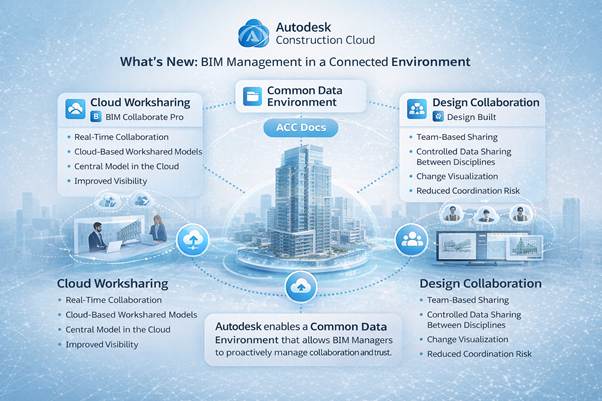
Cloud Worksharing (BIM Collaborate Pro)
- Cloud-hosted central models
- Real-time collaboration
- Improved visibility
- Role-based access control
This shift has introduced new opportunities — but also new responsibilities.
With increased visibility comes increased accountability.
The Common Data Environment (CDE): A Foundation for Trust
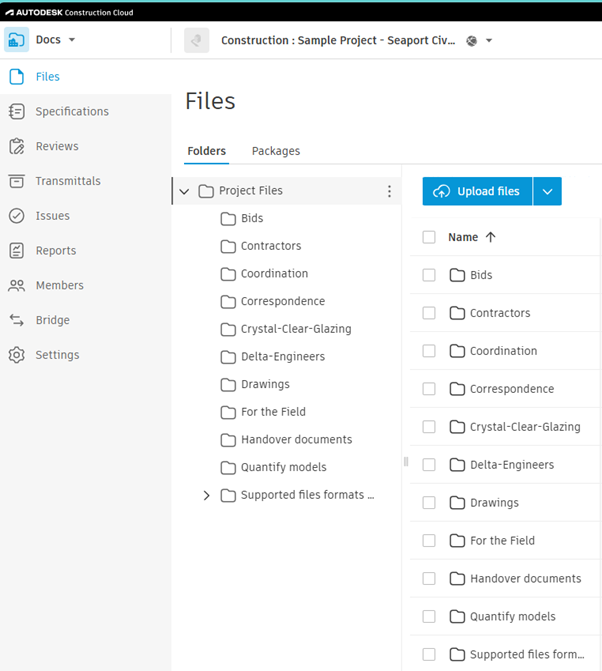
Modern BIM workflows rely heavily on the concept of a Common Data Environment (CDE).
In Autodesk Construction Cloud, this is delivered through Autodesk Docs.
What Is a CDE?
A CDE is not just cloud storage: “It is a structured environment for managing project data.”
It typically includes:
- Work-in-Progress (WIP)
- Shared
- Published / Issued
Why It Matters
The CDE ensures that:
- Everyone works from the same source of truth
- Data is structured and accessible
- Changes are tracked and transparent
- Accountability is clear
For BIM Managers, this becomes the backbone of governance.
What’s New for BIM Managers in Autodesk Construction Cloud
Autodesk continues to enhance ACC to better support BIM Managers in their evolving role.
Here are some key updates from the January 2026 release:
1. Improved Governance in Autodesk Docs
Recent updates focus heavily on control and accountability:
- Naming Standard Import Error Table
Provides detailed feedback when importing naming standards - Markup Control by Version and Review Status
Prevents changes to approved or issued documents - Enhanced Review Workflows
Including editable approvers and reference linking - Delegated Member Management
Allows controlled user management without full admin access
These features help BIM Managers maintain data integrity and consistency.
2. Faster Coordination in Model Coordination
Enhancements improve efficiency in clash detection workflows:
- Quick classification of clashes as “Not an Issue”
- Multi-selection of clashes using Shift-click
- Keyboard shortcuts for faster navigation
These improvements reduce coordination time and improve productivity.
3. Better Publishing Control in Design Collaboration
- Scheduled Publish Suspended Mode
Provides visibility into publishing issues and failures
This ensures more predictable coordination cycles and reduces delays.
4. Data-Driven Insights
With improvements in Insight:
- Quality KPI dashboards
- Power BI integration via Data Connector
- Enhanced reporting capabilities
BIM Managers can now move from coordination to data-driven decision-making.
5. AI Integration with Autodesk Assistant
The Autodesk Assistant now provides:
- Instant help content
- Workflow-integrated support
This reduces time spent searching for solutions and improves efficiency.
The Modern BIM Manager: A Strategic Role
Today’s BIM Manager is no longer focused on fixing problems after they occur.
Instead, they:
- Design workflows that prevent issues
- Enable teams to collaborate effectively
- Ensure data is structured and reliable
- Support informed decision-making
They are not controlling the project; they are enabling it.
Conclusion
The role of the BIM Manager has evolved from a technical support function into a strategic leadership role within the AEC industry.
As projects become more complex and teams more distributed, the need for structured collaboration, data governance, and reliable information becomes critical.
Platforms like Autodesk Construction Cloud have made it possible to manage this complexity, but they do not replace the need for expertise.
That expertise lies with the BIM Manager.
A BIM Manager does not just manage models: “They manage the flow of information that makes modern construction possible.”
Further Reading & Resources
- Autodesk Construction Cloud Updates (January 2026):
https://www.autodesk.com/blogs/construction/january-2026-autodesk-construction-cloud-releases-built-for-whats-next/ - Autodesk Construction Cloud Overview:
https://construction.autodesk.com/ - BIM Collaborate Pro Overview:
https://www.autodesk.com/products/bim-collaborate/overview - What’s New ACC – 2026:
- BUILD Help | January 2026 | Autodesk

