
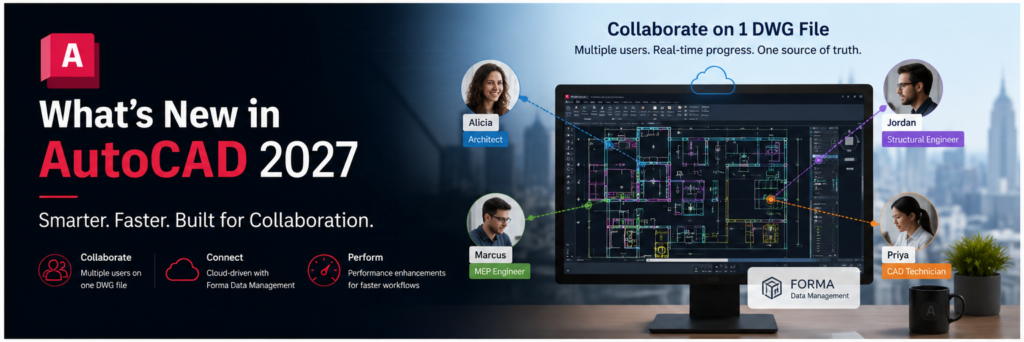
Smarter Workflows, AI-Powered Collaboration, and the Future of Connected Design
The release of AutoCAD 2027 marks another major step forward in Autodesk’s vision for intelligent, connected, and collaborative design workflows.
For decades, AutoCAD has remained one of the world’s most trusted drafting and design platforms. From architecture and engineering to manufacturing and construction, professionals across industries continue to rely on AutoCAD for precision documentation and technical design.
But AutoCAD 2027 is more than just another yearly update. This release introduces smarter automation, AI-assisted workflows, improved collaboration tools, and enhanced cloud connectivity that collectively move AutoCAD into a new era of design productivity.
One of the most exciting developments is Autodesk’s growing focus on collaboration and cloud-based workflows through Forma Data Management, allowing teams to work together more efficiently than ever before. Combined with powerful automation features and the included specialized toolsets, AutoCAD 2027 is designed to help users spend less time on repetitive drafting tasks and more time focusing on design and decision-making.
Whether you are an architect, engineer, CAD manager, drafter, or designer, AutoCAD 2027 introduces improvements that can significantly impact your daily workflows.
A New Direction for AutoCAD
The design industry is changing rapidly.
Projects are becoming more complex, teams are increasingly distributed across multiple locations, and deadlines continue to become tighter. Traditional workflows where one person works on a local DWG file while others wait their turn are no longer efficient enough for modern project delivery.
AutoCAD 2027 addresses these challenges directly by introducing smarter collaboration tools and intelligent automation features designed to reduce repetitive work and improve overall project coordination.
Autodesk’s broader strategy is clear:
- More connected workflows
- More cloud collaboration
- More automation
- More intelligent assistance inside the software itself
This release is a strong indication of where the future of CAD is heading.
Real-Time Collaboration on a Single DWG
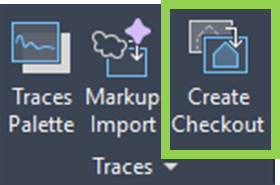
One of the standout features in AutoCAD 2027 is the new collaboration workflow enhancements that allow multiple users to work more effectively on the same project environment. With the new Create Checkout functionality, multiple users can “checkout” a portion of the same DWG file to collaborate.
Traditionally, DWG collaboration could be frustrating. File locking often prevented multiple users from working simultaneously, leading to delays, duplicated work, and coordination issues.
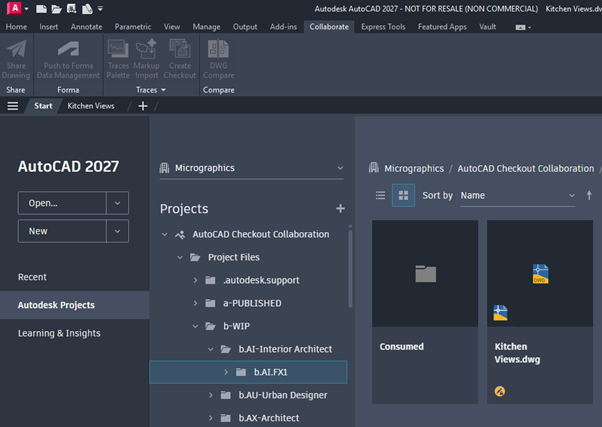
AutoCAD 2027 introduces improved collaboration functionality that helps teams work together more seamlessly. Through Autodesk’s connected cloud environment and Forma Data Management integration, project data becomes more centralized and accessible.
This creates several major advantages:
- Improved version control
- Reduced file conflicts
- Better project coordination
- Faster communication between team members
- More secure cloud-based access to project data
For firms managing large projects with multiple disciplines, these improvements can dramatically increase efficiency.
The move toward collaborative cloud workflows also aligns AutoCAD more closely with the modern expectations of the AECO industry, where connected data environments are becoming standard practice.
Autodesk Assistant: AI Comes to AutoCAD
Perhaps the most exciting innovation in AutoCAD 2027 is the introduction of the Autodesk Assistant, currently available as a technology preview.
Artificial Intelligence is rapidly transforming the design industry, and Autodesk is now bringing AI-assisted workflows directly into AutoCAD.

The Autodesk Assistant acts as an intelligent in-product guide that helps users navigate tasks, troubleshoot issues, and discover workflows without leaving the AutoCAD environment.
Instead of searching through forums or documentation, users can ask conversational questions such as:
- “How do I clean overlapping geometry?”
- “Why are my Xrefs not displaying?”
- “How do I validate my drawing standards?”
The assistant can then provide contextual guidance and recommendations directly within AutoCAD.
This represents a major shift in how users interact with CAD software. Rather than simply responding to commands, AutoCAD is beginning to actively assist users throughout the design process.
Autodesk is also beginning to introduce more context-aware workflows through its AI ecosystem. This means the software can better understand:
- The active drawing environment,
- The current workflow,
- The user’s design intent.
While still evolving, this technology demonstrates Autodesk’s commitment to intelligent design environments where software becomes more proactive, adaptive, and helpful.
Smart Drawing Validation
Maintaining CAD standards across projects and teams has always been a challenge for CAD managers and design firms.
Inconsistent layers, incorrect object properties, annotation problems, and drafting deviations can create significant issues during coordination and project delivery.
AutoCAD 2027 introduces smarter validation tools that help reduce these problems earlier in the design process.
Users can compare drawings against predefined standards and identify inconsistencies automatically. The software can help detect:
- Layer mismatches
- Incorrect line types
- Annotation inconsistencies
- Property deviations
- Non-standard drafting elements
This feature is particularly valuable for organizations that maintain strict CAD standards or deliver projects across large teams.
By identifying issues earlier, firms can reduce rework, improve quality control, and maintain greater consistency throughout the project lifecycle.
Geometry Cleanup Tools
Anyone who has worked with imported survey files, consultant drawings, or legacy DWGs understands how time-consuming geometry cleanup can become.
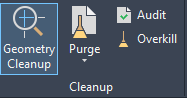
Tiny gaps, overlapping lines, overshoots, undershoots, and drafting inconsistencies can significantly impact productivity and downstream workflows.
AutoCAD 2027 introduces enhanced Geometry Cleanup tools designed to automate much of this process.
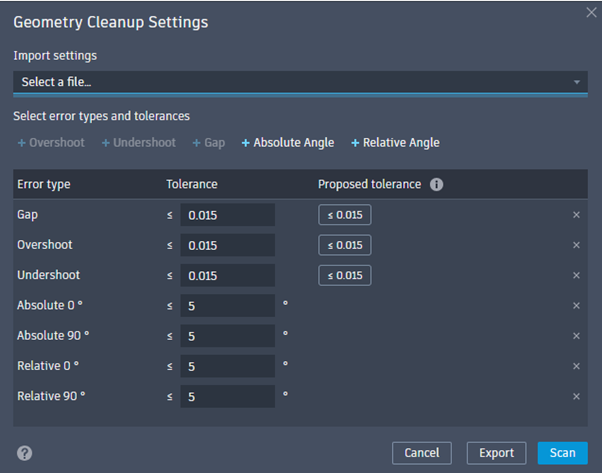
Instead of manually searching for errors, the software can automatically scan drawings and identify problematic geometry.
The system can detect:
- Gaps between objects
- Misaligned geometry
- Duplicate elements
- Overlapping linework
- Small drafting inconsistencies
Users can then review suggested corrections and apply fixes more efficiently.

This is especially beneficial when working with:
- Old project files
- External consultant drawings
- GIS or survey imports
- Scanned and converted CAD files
The result is faster cleanup, improved drawing accuracy, and reduced frustration.
Faster Performance and Improved Stability
Performance improvements remain one of the most important aspects of any AutoCAD release, and AutoCAD 2027 continues to enhance speed and responsiveness across the platform.
Users working on large and complex projects will appreciate improvements to:
- Graphics performance
- File handling
- 3D navigation
- Display responsiveness
- Large coordinate workflows
For External References on coordination projects, the Xref command now identifies Missing Xrefs making it easier to load missing references. Loading files from Forma as a cloud destination is immediately available within your workspace on the Xref Palette.
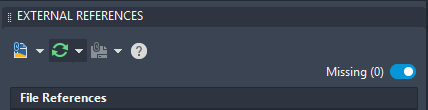
Smoother zooming, panning, and orbiting contribute to a more fluid user experience, especially on detailed projects.
Enhanced stability also improves reliability during long production sessions, helping reduce interruptions and improving overall productivity.
As projects continue to grow, in size and complexity, performance optimization becomes increasingly important, and AutoCAD 2027 clearly focuses on delivering a faster and more responsive environment.
The Power of Specialized Toolsets
One of the most underutilized advantages of modern AutoCAD subscriptions is access to the included specialized toolsets.
Many users still think of AutoCAD as a general drafting platform, but Autodesk now includes industry-specific toolsets that can dramatically improve productivity.
These include:
- Architecture Toolset
- Electrical Toolset
- Mechanical Toolset
- MEP Toolset
- Plant 3D
- Map 3D
- Raster Design
Each toolset provides intelligent objects, automation features, libraries, and workflows tailored to specific industries.
For example:
- The Architecture Toolset includes intelligent walls, doors, and windows.
- The Electrical Toolset automates circuit numbering and panel layouts.
- Mechanical includes standard parts libraries and manufacturing workflows.
- Plant 3D supports piping and process plant design.
These tools reduce repetitive drafting and allow users to work more efficiently using intelligent design components instead of manually creating everything from scratch.
Autodesk has reported significant productivity gains when using specialized toolsets compared to standard AutoCAD workflows alone.
For firms looking to improve efficiency without changing software platforms entirely, the specialized toolsets offer enormous value.
Forma Data Management
Another major theme in AutoCAD 2027 is connected cloud workflows through Forma Data Management.
As Autodesk continues evolving its cloud ecosystem, AutoCAD is becoming more integrated into connected project environments.
Forma Data Management enables:
- Centralized project storage
- Secure access controls
- Version tracking
- Cloud collaboration
- Connected workflows between teams
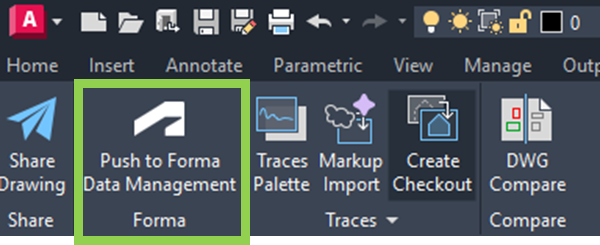
This allows users to work more efficiently across locations while maintaining better control over project information. Including the new commands which are used for Cloud Collaboration and Connected workflows between teams:

The move toward cloud-connected CAD environments is becoming increasingly important as hybrid work and distributed project teams become the norm.
AutoCAD 2027 positions itself strongly within this future.
Conclusion
AutoCAD 2027 is not simply an incremental update, it represents Autodesk’s continued transition toward intelligent, connected, and collaborative design workflows.

With AI-assisted features, improved automation, smarter validation tools, enhanced collaboration, and integrated cloud connectivity, AutoCAD is evolving into far more than a drafting application.
For users and firms willing to embrace these new workflows, the benefits are substantial:
- Faster production
- Improved collaboration
- Better quality control
- Reduced repetitive work
- Greater efficiency across teams
Combined with the included specialized toolsets, AutoCAD 2027 offers one of the most capable and versatile design environments Autodesk has ever released.
The future of CAD is becoming smarter, faster, and more connected and AutoCAD 2027 gives us an exciting glimpse into that future.

