
The world of architectural visualisation continues to evolve at an incredible pace, and Lumion 2026 represents one of the most significant workflow-focused releases in recent years. Rather than simply adding visual effects, Lumion 2026 focuses on helping architects, designers, engineers, landscape architects, and BIM professionals work faster, smarter, and with greater creative freedom.
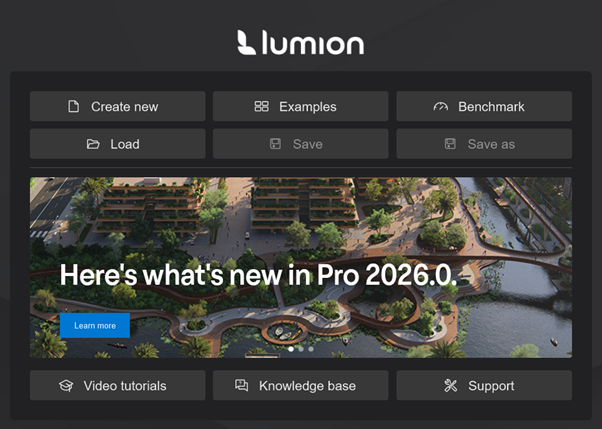
From AI-powered rendering enhancements and intelligent environment population tools to improved material synchronisation and deeper Autodesk Revit integration, Lumion 2026 is designed to reduce repetitive tasks while improving visual quality.
For Revit users especially, the release is particularly exciting. With support for Revit 2027, enhanced LiveSync capabilities, and the emergence of AI-assisted workflows inside the Autodesk ecosystem, the connection between BIM authoring and real-time visualization has never been stronger.
A New Direction: Workflow Optimisation
One of the first things users will notice about Lumion 2026 is that the development team has focused heavily on workflow efficiency.
Instead of requiring multiple steps to create realistic environments or high-quality presentations, Lumion now automates many previously manual processes. The goal is simple:
- Spend less time setting up scenes
- Spend less time placing assets
- Spend less time rendering
- Spend more time designing
Lumion 2026 introduces several intelligent tools that accelerate project creation while maintaining the creative control that professionals require.
External references:
Lumion
- Area placement tool
- New nature asset collection
- Fill-in clipping planes
- New example scenes and templates
- Improved AI upscaler (4x and 16K)
- Increased panorama slots
Area Placement: Populate Large Sites in Seconds
Perhaps the most impactful new modelling feature is the Area Placement Tool.
Creating landscapes, parks, campuses, estates, business parks, and urban developments, traditionally required manually placing hundreds or thousands of objects. Trees, shrubs, rocks, grass clusters, and environmental assets could consume hours of setup time.
The new Area Placement Tool dramatically simplifies this process.
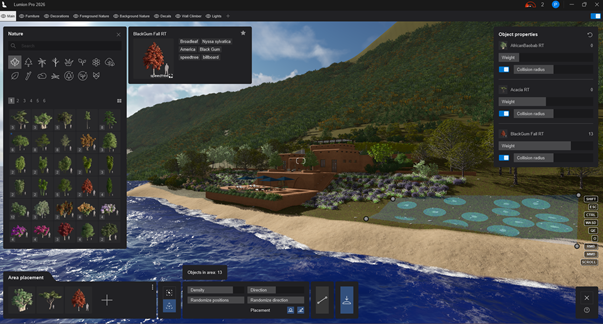
Users can now:
- Select up to 20 nature assets simultaneously
- Define a placement area
- Control density and distribution
- Randomize variation automatically
- Populate large surfaces in seconds
The tool offers two placement methods:
Surface-Based Placement
Select an existing surface material and automatically distribute vegetation across that area.
Examples:
- Grass fields
- Natural terrain
- Garden areas
- Open spaces
Custom Area Placement
Draw a custom boundary and populate the enclosed region with selected assets.
Examples:
- Parking lot landscaping
- Estate developments
- Roadside vegetation
- Residential complexes
- Urban parks
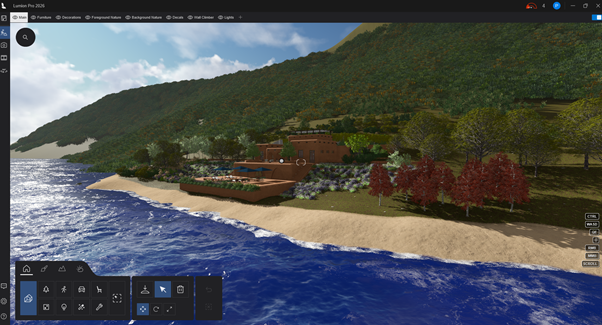
The result is a significantly faster site creation workflow while still maintaining natural variation and realism.
AI Upscaler 4X: Bigger, Sharper, Faster
Artificial Intelligence continues to transform architectural visualization.
Lumion 2026 introduces a significantly enhanced AI Upscaler capable of generating renders up to four times larger than the original image while preserving visual quality.
Benefits include:
- Sharper presentation boards
- Higher-resolution marketing material
- Improved print quality
- Faster delivery of large-format images
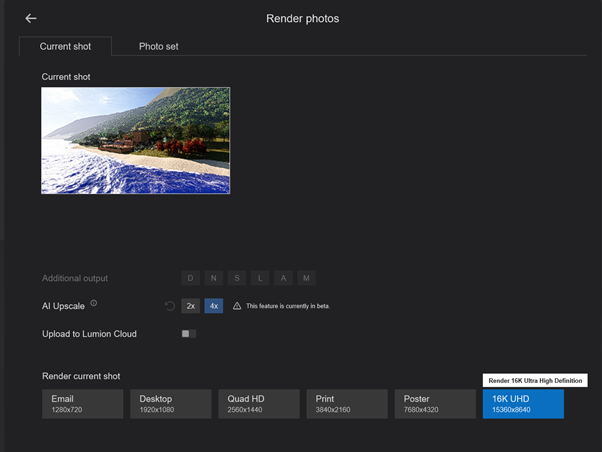
The new 4X AI Upscaler allows render outputs reaching extremely high resolutions without requiring the render engine to calculate every pixel from scratch.
For architects producing:
- Competition entries
- Client presentations
- Marketing brochures
- Large-format prints
this feature can dramatically reduce rendering time while maintaining excellent visual fidelity.
Fill-In Clipping Planes for Professional Sections
Architectural sections have become a major part of modern presentations.
However, open clipping planes often leave hollow geometry exposed, reducing visual quality.
Lumion 2026 introduces Fill-In Clipping Planes, automatically generating cap surfaces where geometry is cut.
Benefits include:
- Cleaner section renders
- Better presentation quality
- Improved construction visualization
- More professional animations
Architects can now create compelling cutaway perspectives and sectional animations without extensive post-production work.
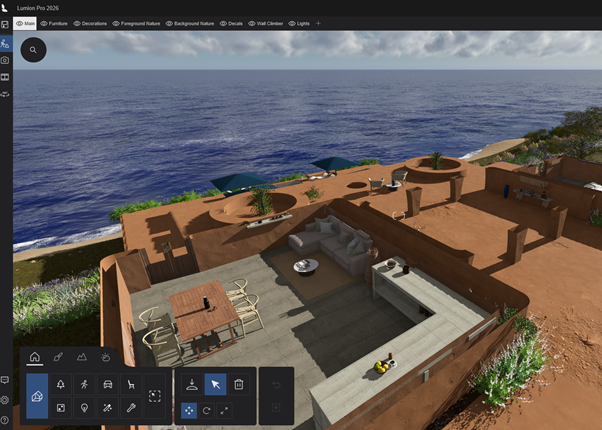
Improved PBR Material Synchronisation
One of the most requested improvements for BIM workflows has been better material synchronisation.
Lumion 2026 now supports enhanced real-time synchronization of:
- Albedo maps
- Normal maps
- Roughness maps
- Material properties
- PBR settings
When changes are made inside Revit, SketchUp, or ArchiCAD, those updates can now be reflected immediately in Lumion through LiveSync.
This eliminates the traditional cycle of:
- Modify material
- Export model
- Import model
- Check results
- Repeat
Instead, designers can evaluate materials instantly as they work.
From Photo to Photorealism
In the world of architectural visualisation, realism has always depended heavily on one critical element: materials. No matter how detailed your model is, without high-quality materials, your renders will never truly come to life.
Traditionally, creating realistic materials has been a time-consuming and technical process. But with the introduction of AI-powered material generation in Lumion Cloud, that process is being transformed entirely.
This shift is not just an upgrade, it’s a fundamental change in how architects and designers approach visual storytelling.
Why Materials Matter in Visualisation
Materials define how light interacts with surfaces. They determine whether a building feels cold or warm, modern or rustic, conceptual or photorealistic.
Modern rendering engines, including Lumion, rely on Physically Based Rendering (PBR). PBR uses real-world physics to simulate how surfaces respond to light, ensuring consistent and believable results across different lighting conditions.
A complete PBR material typically includes:
- Base Color (Albedo)
- Normal
- Height
- Roughness
- Metalness
While powerful, building these materials manually often requires tools like Adobe Photoshop or Substance 3D Designer, along with a solid understanding of rendering workflows.
The Traditional Workflow: Accurate but Time-Intensive
Before AI integration, creating a custom material meant:
- Finding or photographing a texture
- Cleaning and editing the image
- Generating multiple PBR maps manually
- Importing each map into Lumion
- Tweaking parameters to achieve realism
This process could take anywhere from minutes to hours, especially if high-quality results were required.
For many professionals, this created a bottleneck between design intent and final visual output.
Enter AI: A Smarter Way to Create Materials
With Lumion’s new AI-powered material tools, that workflow is dramatically simplified.
Instead of manually building each map, users can now:
- Upload a single image (e.g. a brick wall, timber floor, or concrete surface)
- Let AI analyze the texture
- Automatically generate a full set of PBR maps
From Real World to Render in Seconds
One of the most exciting aspects of AI-generated materials is the ability to capture real-world environments.
Imagine this workflow:
- You take a photo of a brick wall on-site
- Upload it into Lumion’s AI material generator
- Instantly receive a complete, ready-to-use PBR material
- Apply it directly to your model
The result? A render that reflects actual site conditions, not just approximations from a generic library.
This creates a stronger connection between concept, context, and presentation.
Step 1: Capture or Source Your Material
Step 2: Access Lumion Cloud
Step 3: Upload your Image

Step 4: Drop and Drag or Browse local files to select your image
Step 5: Crop and Prepare the Texture
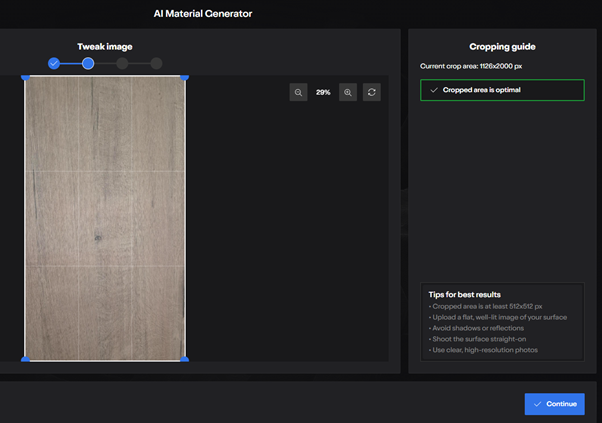
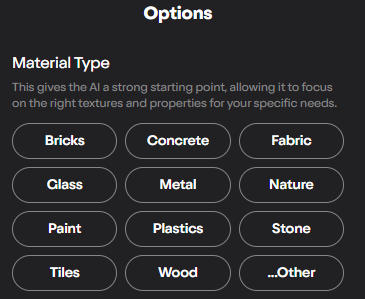
Step 6: Press Continue and Select Material Type
Step 7: Generate PBR Material – Base Material
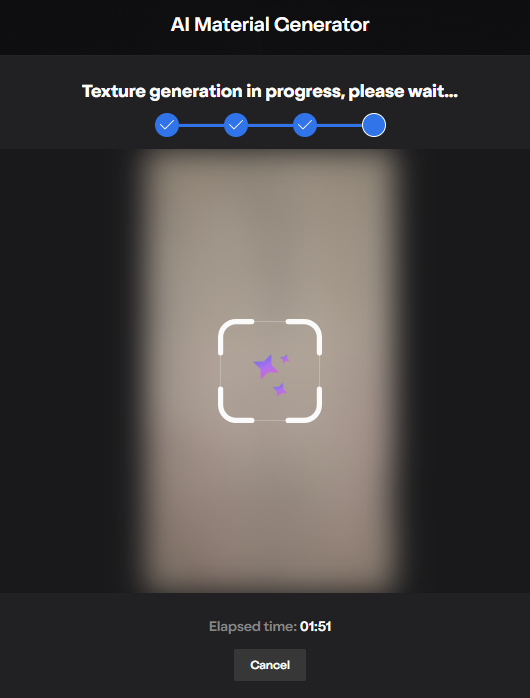
Step 8: Once generated, review the base texture. You can tweak properties such as brightness, contrast, or tiling.
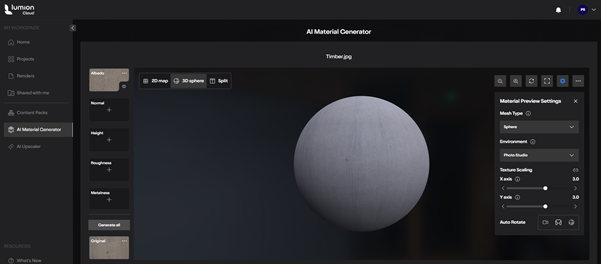
Step 9: Generate Full PBR Maps – Select Generate All
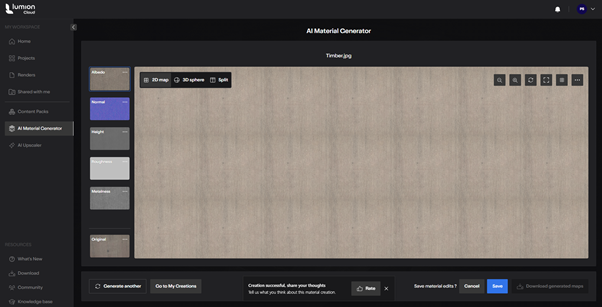
Step 10: Save and Reuse
Optional Enhancements: AI Upscaling
To further enhance your material, make use of the AI Upscaler to upscale to 4K, 8K or 16K
Enhancing Your Lumion Workflow
AI-generated materials don’t just save time, they enhance flexibility.
You can:
- Rapidly test different finishes during design iterations
- Create unique, project-specific materials
- Build a custom material library over time
- Maintain consistency across multiple visualisations
When combined with Lumion’s real-time rendering capabilities, this allows for faster decision-making and more interactive client presentations.
Bridging Design and Visualisation
For professionals working with BIM tools like Autodesk Revit, this advancement is particularly powerful.
Instead of relying solely on predefined materials, designers can:
- Export their models into Lumion
- Apply AI-generated materials tailored to the project
- Achieve high-end visual quality without leaving their workflow ecosystem
This creates a seamless bridge between technical design and visual storytelling.
The Bigger Picture: A Shift in the Industry
What we’re seeing is more than just a new feature, it’s a shift in mindset.
Rendering tools are evolving from content libraries into intelligent systems that assist users in generating their own content.
AI-powered materials represent:
- Greater creative freedom
- Reduced dependency on external tools
- Faster turnaround times
- More personalised, context-driven designs
In short, the barrier between idea and visualisation is shrinking.
Expanded Asset Library and Photogrammetry Content
Lumion has long been known for its extensive content library.
Lumion 2026 expands this further through:
- New photogrammetry-based trees
- Refined vegetation assets
- Updated outdoor models
- Higher-quality environmental objects
Photogrammetry captures real-world objects through photographic scanning, resulting in more accurate geometry and texture detail.
The benefit is greater realism with minimal effort.
For landscape architects and urban designers, these additions help create richer, more believable environments while reducing the need for custom asset creation.
Improved Layer Management
Complex projects often contain hundreds or thousands of assets.
Lumion 2026 introduces improved layer management capabilities, including:
- Draggable layer ordering
- Easier scene organization
- Better visibility control
- Faster presentation setup
This seemingly small enhancement can significantly improve productivity on large-scale projects where multiple scene configurations must be maintained.
Lumion View: Real-Time Visualisation Inside Revit
One of the most exciting developments surrounding Lumion is the continued evolution of Lumion View.
Lumion View is a lightweight visualization environment that operates directly inside Revit while incorporating LiveSync functionality into a single integrated workflow.
Key capabilities include:
- Real-time design visualization
- Material previews
- Lighting controls
- Style presets
- Fast conceptual rendering
Rather than exporting models repeatedly, users can evaluate design decisions while actively modelling.
Revit 2027 Support Arrives
Lumion View 2026 introduces official support for Autodesk Revit 2027.
Additional improvements include:
- Enhanced LiveSync stability
- Improved consistency
- Animated water in live views
- Expanded visualization capabilities
This means firms upgrading to Revit 2027 can continue using their Lumion workflows without interruption.
LiveSync Continues to Improve
LiveSync remains one of Lumion’s strongest features.
The technology creates a live connection between Revit and Lumion, enabling:
- Real-time geometry updates
- Camera synchronization
- Material synchronization
- Automatic model importing
Design changes made in Revit appear immediately inside Lumion.
For BIM professionals, this means:
- Faster design reviews
- Improved stakeholder engagement
- Reduced export/import cycles
- Better collaboration between design and visualization teams
The addition of real-time PBR synchronization further strengthens this workflow.
AI and the Future of Revit Visualisation
Perhaps the most interesting trend is not a single Lumion feature, but the broader integration of Artificial Intelligence into BIM workflows.
With Autodesk introducing AI-powered assistance inside Revit 2027, designers are beginning to experience a new generation of intelligent design tools.
These AI assistants can help users:
- Locate commands
- Understand workflows
- Learn features faster
- Navigate complex software environments
As AI continues to evolve, visualisation platforms like Lumion are positioned to benefit significantly.
Imagine future workflows where:
- AI generates planting strategies
- AI recommends environmental assets
- AI optimizes scene composition
- AI suggests material selections
- AI automates camera placement
Lumion’s investment in AI Upscaling is already evidence of this direction. The industry is rapidly moving toward AI-assisted design and visualization ecosystems.
Contextual Site Data and Smarter Design Exploration
Another emerging trend closely tied to Revit 2027 workflows is the growing availability of contextual site information during conceptual design.
Modern design workflows increasingly incorporate:
- Existing terrain
- Environmental context
- Geographic information
- Infrastructure data
- Surrounding development information
Through Autodesk’s evolving cloud ecosystem and early-stage planning tools, designers can access richer contextual information earlier in the project lifecycle.
When paired with Lumion’s real-time visualization capabilities, teams can evaluate:
- Site integration
- Landscape design
- Solar access
- Environmental impact
- Urban relationships
much earlier than traditional workflows allowed.
The result is better-informed design decisions and more compelling stakeholder presentations.
Why Lumion 2026 Matters
Lumion 2026 is not simply a rendering update.
It represents a broader shift toward:
- Automation
- AI-enhanced workflows
- Real-time collaboration
- Faster iteration cycles
- Better BIM integration
The combination of:
- Area Placement
- AI Upscaling
- Fill-In Clipping Planes
- Improved LiveSync
- Enhanced PBR synchronization
- Expanded asset libraries
- Revit 2027 compatibility
Creates a platform that is faster, smarter, and more connected than previous releases.
Conclusion
Lumion 2026 demonstrates how architectural visualisation is evolving beyond traditional rendering. Today’s designers need tools that integrate seamlessly into BIM workflows, respond instantly to design changes, and leverage Artificial Intelligence to reduce repetitive tasks.
For Revit users, the improved LiveSync workflow, Lumion View integration, and Revit 2027 compatibility make the transition between modelling and visualization almost effortless.
Whether you’re an architect creating client presentations, a BIM manager coordinating project reviews, a landscape architect developing masterplans, or a visualization specialist producing marketing imagery, Lumion 2026 delivers meaningful productivity improvements while raising the quality ceiling for architectural storytelling.
As AI-powered workflows continue to mature across both Autodesk and Lumion platforms, the gap between design creation and visualization will continue to shrink, allowing professionals to focus less on software processes and more on designing exceptional spaces.

