As electrical designs become increasingly complex, maintaining clean and accurate geometry is essential. Small drafting errors such as tiny gaps, overshoots, undershoots, or slightly misaligned angles can lead to connectivity issues, inaccurate documentation, and additional engineering time spent correcting drawings before release.
To address these challenges, AutoCAD Electrical 2027 introduces the new Geometry Cleanup tool. This intelligent feature automatically analyses drawing geometry, identifies common drafting issues, and provides guided repair options that help engineers improve drawing quality without the tedious process of manually inspecting every entity.
Whether you’re creating new electrical schematics or updating legacy drawings, the Geometry Cleanup tool helps ensure your designs are accurate, consistent, and ready for manufacturing.

Automatically Detect Common Geometry Issues
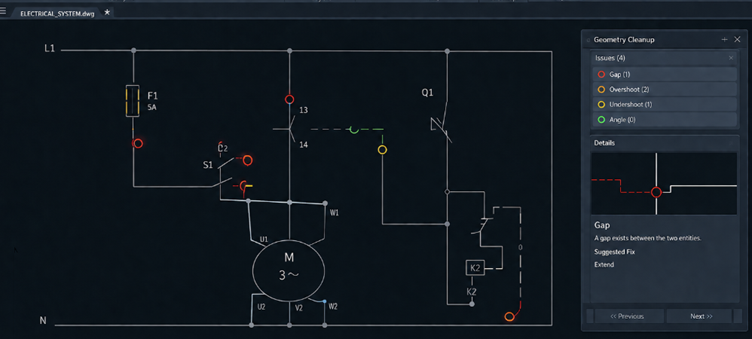
The Geometry Cleanup tool scans selected geometry and automatically detects common drafting problems that can affect drawing quality.
During the scan, AutoCAD Electrical identifies:
- Gaps between connected entities
- Overshoots where lines extend beyond their intended connection
- Undershoots where geometry stops short of connecting
- Misaligned or incorrect angles
Instead of manually searching through complex drawings, every issue is automatically highlighted using visual markers directly within the drawing area. This makes it easy to identify potential problems and review them individually.
By automating the inspection process, designers can significantly reduce the time required to prepare drawings for review or manufacturing.
Configure the Scan to Match Your Standards
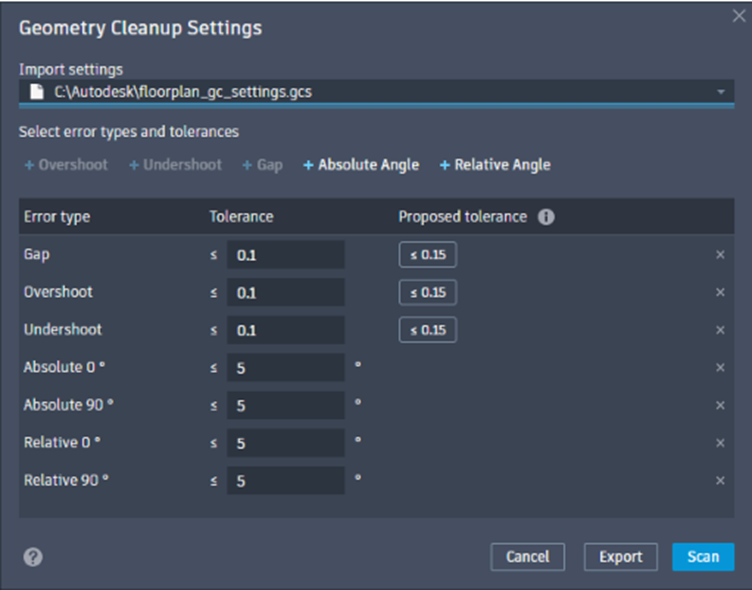
One of the biggest advantages of the new Geometry Cleanup tool is its flexibility. Every company has different drafting standards, which is why AutoCAD Electrical provides complete control over how geometry is analysed.
The Geometry Cleanup Settings dialog allows you to configure the scan before any analysis begins.
Users can:
- Import predefined cleanup settings
- Select which geometry errors should be detected
- Configure custom tolerance values
- Review Autodesk’s recommended tolerance values
- Export settings for future projects
- Scan drawings using customised criteria
This allows organisations to standardise geometry validation across multiple users and projects while ensuring consistent drawing quality throughout the business.
If preferred, designers can simply accept the recommended tolerances provided by AutoCAD Electrical, making setup quick and straightforward.
Interactive Review and Intelligent Repair
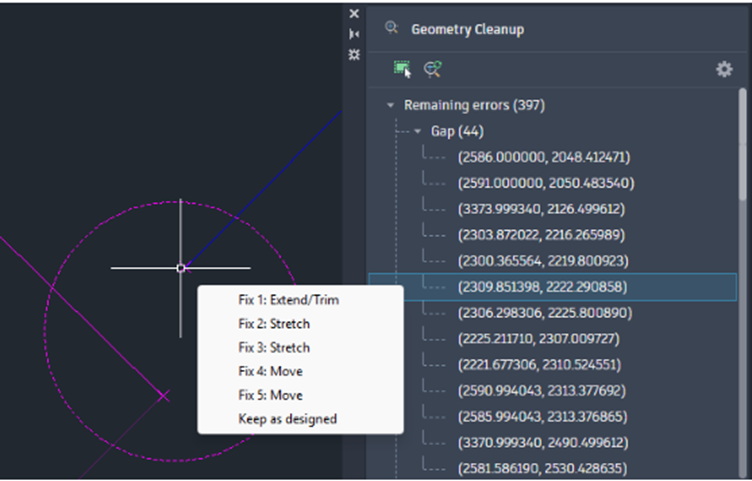
Once the scan has completed, AutoCAD Electrical opens the Geometry Cleanup palette, displaying every detected issue in a structured list.
Selecting an item automatically highlights its location within the drawing, making it easy to navigate between errors.
Rather than forcing automatic corrections, AutoCAD Electrical gives designers complete control over every repair.
Available repair options include:
- Extend/Trim
- Stretch
- Move
As the cursor hovers over each repair option, the software displays a live preview showing exactly how the geometry will be modified before any changes are applied.
This interactive workflow allows designers to confidently select the most appropriate repair while avoiding unintended modifications.
If the highlighted geometry is intentional, users can simply select Keep as Designed, leaving the geometry unchanged while continuing with the review process.
This balance between automation and user control makes the Geometry Cleanup feature both powerful and reliable.
Improve Drawing Accuracy and Productivity
By combining intelligent geometry detection with guided repair suggestions, the Geometry Cleanup tool dramatically reduces the amount of manual editing required during drawing preparation.
Key benefits include:
- Automatic detection of drafting errors
- Improved drawing accuracy
- Faster drawing cleanup
- Reduced manual editing
- Consistent drawing standards
- Greater confidence before releasing drawings for manufacturing
Instead of spending valuable engineering time searching for small drafting mistakes, designers can focus on completing projects while allowing AutoCAD Electrical to identify potential issues automatically.
Additional Commands for Faster Workflows
To improve usability, AutoCAD Electrical 2027 introduces several new commands that provide quick access to the Geometry Cleanup tools.

New System Variables
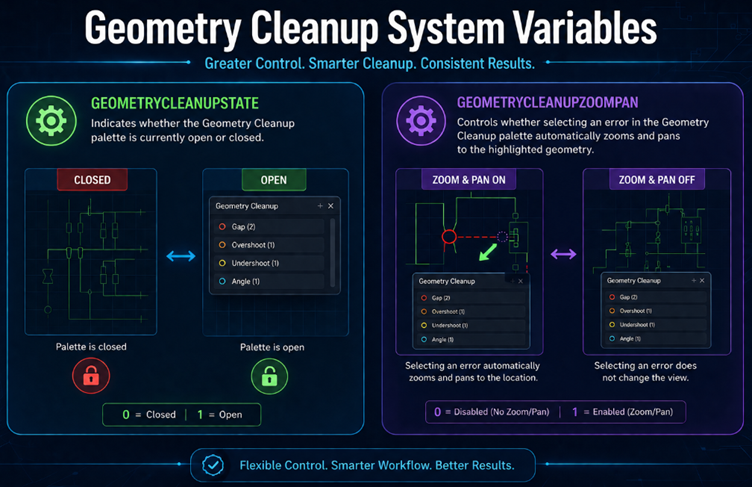
AutoCAD Electrical 2027 also introduces two new system variables that provide additional control over the Geometry Cleanup experience.
A Smarter Way to Prepare Drawings
The Geometry Cleanup tool is more than just a drafting utility—it is a quality assurance feature designed to help engineering teams produce cleaner, more reliable drawings with significantly less effort.
From configurable scan settings and reusable cleanup profiles to intelligent repair recommendations and live previews, every part of the workflow has been designed to improve productivity while giving designers complete control over their drawings.
By automatically detecting common geometry issues, suggesting appropriate repairs, and allowing intentional geometry to remain untouched, AutoCAD Electrical 2027 helps reduce design errors, improve documentation quality, and accelerate project delivery.
Whether you’re preparing drawings for internal design reviews, customer approval, or manufacturing release, the new Geometry Cleanup tool provides a faster, smarter, and more consistent approach to ensuring high-quality electrical documentation.
As organisations continue to embrace automation and standardisation, the Geometry Cleanup feature represents another significant step forward in helping engineers spend less time correcting drawings and more time designing innovative solutions.