
This Release introduces several general enhancements focused on improving usability, graphics performance, and workflow efficiency. These updates aim to streamline everyday design tasks while providing a smoother and more modern user experience for engineers and designers.

One of the notable additions in Inventor 2027 is the enhancement to the Multi-Sheet Plot functionality. Users can now access Multi-Sheet Plot directly from the Start menu, making the feature easier and faster to locate. This improvement simplifies the process of publishing multiple drawing sheets in a single operation, helping teams save time when preparing documentation packages for manufacturing, review, or client approval
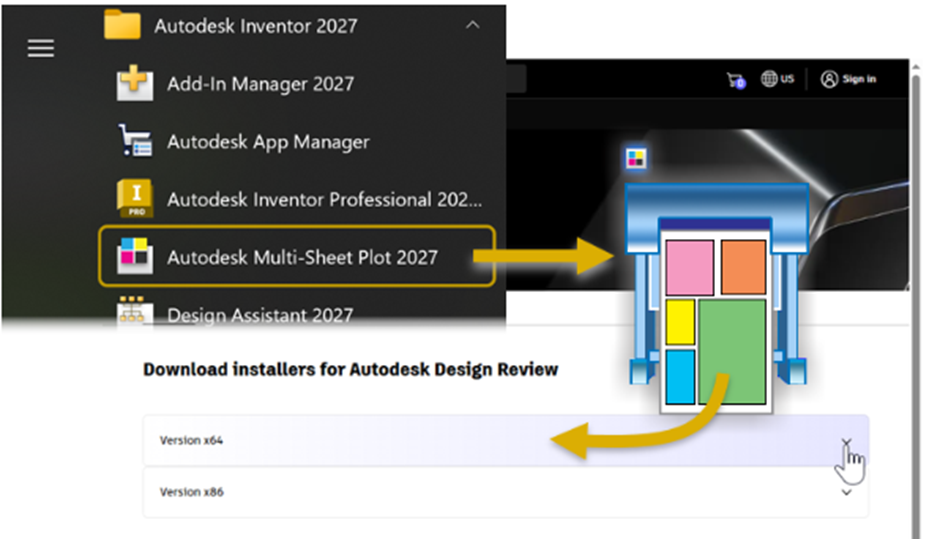
It is important to note that Autodesk Design Review must be installed to use the Multi-Sheet Plot feature. Once installed, users can efficiently batch plot multiple drawings without needing to open each file individually. This enhancement is especially useful for companies managing large projects with extensive drawing sets, where productivity and consistency are critical.

Another major improvement in Inventor 2027 is the introduction of DirectX 12 (DX12) support. Inventor now uses DX12 by default on systems with compatible graphics hardware, delivering improved graphics performance and better visual responsiveness. This update provides smoother navigation, enhanced display handling, and better overall graphics efficiency when working with large assemblies and detailed models.
For users whose systems may not fully benefit from DX12, Inventor still provides the flexibility to switch back to DirectX 11. This can be done through Application Options under the Hardware tab. Autodesk has ensured that users maintain control over their graphics settings depending on system compatibility and performance requirements. After changing the graphics API, Inventor must be restarted for the changes to take effect.

The graphics mode selection process has also been improved. Inventor 2027 automatically determines the most suitable graphics mode based on the capabilities of the system hardware. This automatic detection helps users achieve optimal performance without requiring manual configuration, reducing setup time and minimising compatibility issues.
In addition to graphics improvements, Autodesk has introduced clearer licensing visibility within the Inventor interface. The product title bar now displays the license entitlement type for specific product versions. These include Student, Trial, Educational, and Not for Resale (Non-Commercial) licenses. This small but valuable enhancement helps users quickly identify which license type is currently active, improving transparency and reducing confusion in educational or testing environments.

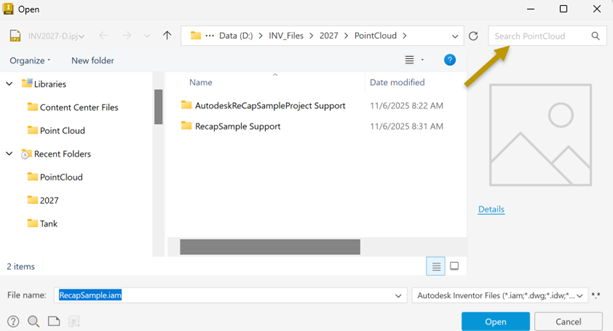
Inventor 2027 also brings enhancements to the Open and Save workflow, making file management more efficient and user-friendly. A new basic file search capability has been added to the Open and Save dialogues. Users can now quickly search for files directly within these windows, helping reduce time spent browsing through folders and project directories.
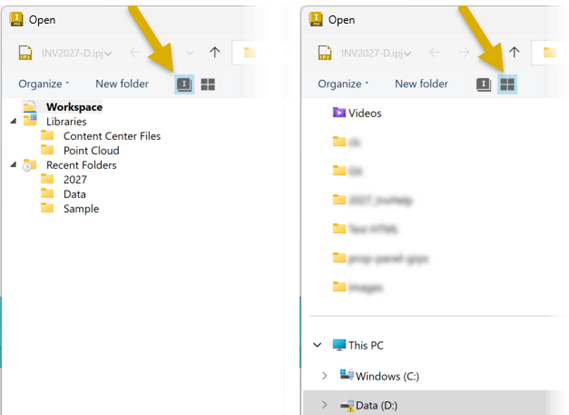
Another useful addition is the ability to choose between two different tree view navigation styles. Users can select either the Inventor Workspace Tree View or the Windows Navigation Tree View depending on their preference and workflow requirements. This flexibility allows users to work within a familiar navigation environment while maintaining easier access to project data.
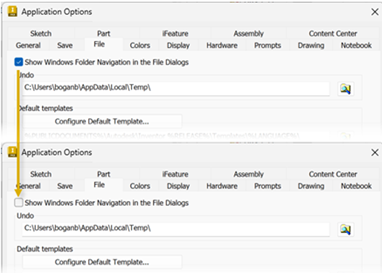
For users who prefer a cleaner and more focused Inventor-based file browsing experience, Autodesk has added additional customisation options. To display only the Inventor Workspace Tree View, users can navigate to the Ribbon and select Tools > Application Options > File tab, then deselect “Show Windows Folder Navigation in the File Dialogues.” Once disabled, the Windows Navigation Tree View is removed from the dialogue, resulting in a simplified and more streamlined interface.
Overall, the general enhancements introduced in Inventor 2027 focus heavily on improving performance, simplifying workflows, and enhancing the user experience. From DX12 graphics support and automatic hardware optimisation to improved file management and Multi-Sheet Plot accessibility, Autodesk continues to refine Inventor to better support modern engineering and design workflows.

