

Introduction
In the ever-evolving world of architecture, staying ahead means embracing innovation. One of the most transformative advancements in recent years is the integration of Artificial Intelligence (AI) within design tools particularly Autodesk Revit. Once known strictly as a Building Information Modeling (BIM) powerhouse, Revit is now leveraging AI to streamline design processes, reduce human error, and help architects focus more on creativity and less on repetitive tasks.
How AI Is Changing the Game in Revit
AI in Revit isn’t about replacing Architects, it’s about empowering them. From design suggestions to data analysis, AI enhances the architectural workflow in the following keyways:
1. Automated Design Assistance
AI-driven tools can now analyze design constraints, user input, and building requirements to suggest optimized layouts. Tools like Generative Design in Revit use AI algorithms to evaluate thousands of design options based on goals such as maximizing daylight, minimizing costs, or improving traffic flow within the structure. Architects no longer need to model countless iterations manually, the AI handles the heavy lifting.

2. Error Detection and Quality Assurance
One of the most practical applications of AI in Revit is real-time clash detection and code compliance analysis. With machine learning, Revit can flag inconsistencies, identify potential errors early, and suggest corrections, all before construction begins. This reduces costly rework and helps ensure designs meet required standards.
3. Intelligent Automation of Repetitive Tasks
Creating sheets, tagging elements, and organizing views can be time-consuming. AI-enhanced plugins and Dynamo scripts now automate these tasks. For instance, smart tagging tools can recognize, and label elements based on their properties, while AI can even recommend sheet layouts based on project standards.
4. Data-Driven Design Insights
AI helps turn BIM data into actionable insights. Whether you’re analyzing energy performance or material usage, AI tools can visualize patterns, identify inefficiencies, and suggest more sustainable or cost-effective alternatives, leading to smarter, greener designs.
Examples and Plugins
Several Autodesk and third-party tools are pushing these capabilities further:
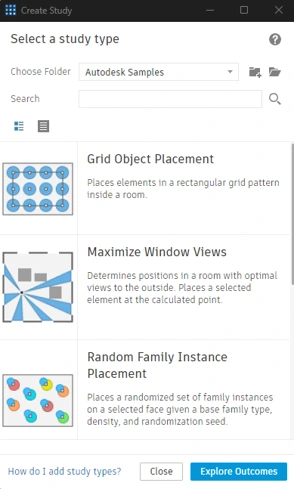
- Autodesk Generative Design for Revit
- Description: Enables algorithm-driven design studies based on user-defined goals.
Pele AI
- Description: Pele is an AI-powered assistant designed to automate and streamline manual tasks in Revit, allowing users to focus more on creative aspects
- Download: Available on the Autodesk App Store
- External Link: Pele AI | Revit | Autodesk App Store

Veras for Autodesk Revit
- Description: Veras is an AI-powered visualization app that uses your 3D model geometry as a substrate for creativity and inspiration, enhancing ideation and visualization workflows.
- Download: Available on the Autodesk App Store
- External Link: Veras® for Autodesk® Revit® | Revit | Autodesk App Store

- WiseBIM AI for Autodesk Revit
- Description: WiseBIM utilizes artificial intelligence to convert 2D plans into Revit elements swiftly and accurately. By importing existing architectural 2D plans, the tool automatically detects and creates detailed representations, including walls, windows, doors, and slabs.
- Download: Available on the Autodesk App Store
- External Link: WiseBIM AI for Autodesk® Revit® | Revit | Autodesk App Store

The Future of AI in Architecture with Revit
As AI continues to evolve, its role in architectural design will only expand. Future developments may include:
- Predictive maintenance modelling.
- Context-aware AI that adapts to specific user workflows and design philosophies.
The ultimate goal is to create a design environment where architects can focus on vision and creativity while AI handles the complexity behind the scenes.
Conclusion
The integration of AI into Revit is more than just a technological upgrade, it’s a paradigm shift for the architectural industry. By automating routine tasks, enhancing design intelligence, and enabling data-driven decision-making, AI helps architects do what they do best, design with purpose, precision, and passion.

