Ensuring robust quality assurance (QA) processes is as essential as efficient design data management in modern product development environments, where speed, accuracy, and reliability are all critical to success.

Autodesk Vault Professional, a powerful Product Data Management (PDM) solution, plays a key role in supporting QA by improving data accuracy, enforcing controlled processes, and maintaining full traceability throughout the product lifecycle.
Centralised Data Management for Quality Control
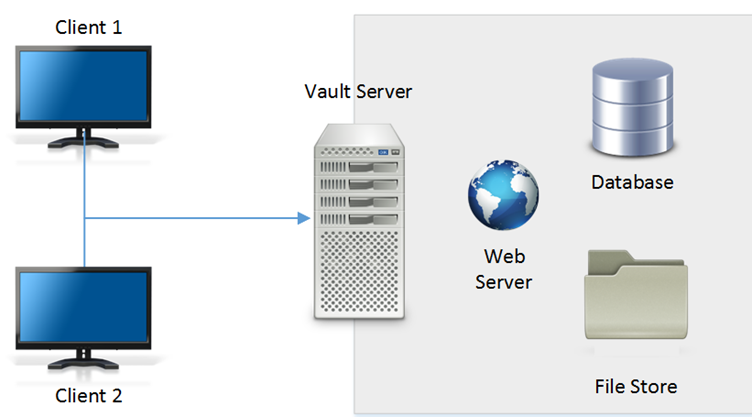
One of the core strengths of Autodesk Vault is its centralised data repository, where all design and engineering information is securely stored. This single source of truth is essential for quality assurance, as it eliminates risks associated with fragmented data, such as incorrect file versions, missing documentation, or inconsistent specifications. With accurate, up-to-date information always available, QA teams can confidently verify that designs meet the required standards.
Version and revision control
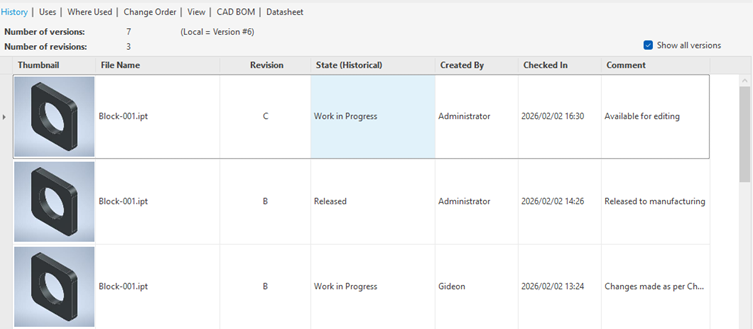
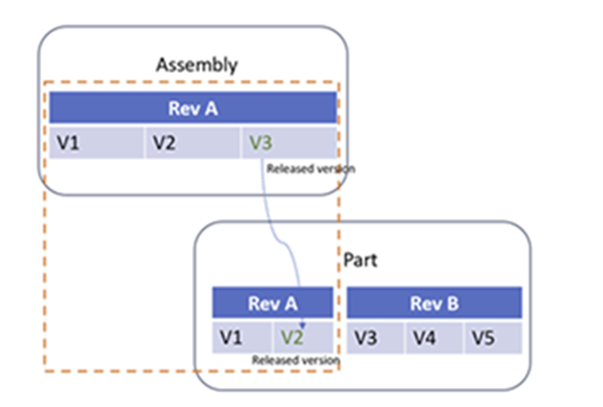
Vault Professional ensures strict version and revision control, allowing teams to track every change made to a design. This capability is critical for quality assurance, as it provides full visibility into design history and ensures that only approved, validated versions progress through the lifecycle. If issues are identified, teams can quickly trace back through revisions to understand when and why changes were made.
Automated Workflows, Lifecycle Control, and Quality Gatekeeping
Autodesk Vault uses automated workflows and lifecycle states to enforce structured approval and release processes across the product development cycle. As designs progress through defined lifecycle stages—such as Work in Progress, In Review, Released, or Obsolete—Vault acts as a controlled quality gate at each transition. This ensures that data cannot advance to the next stage unless all required criteria, reviews, and approvals have been completed. By aligning workflow automation with lifecycle management, Vault reduces the risk of human error, strengthens process compliance, and ensures only fully validated designs are released to manufacturing.

Supporting Traceability, History, and “Where Used” Visibility
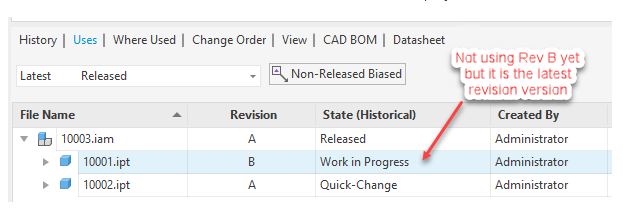
For quality assurance, traceability is critical, and Autodesk Vault strengthens this through its History and “Where Used” functionality. The History tab provides a complete record of design activity, allowing teams to track changes, revisions, and lifecycle progression over time. The “Where Used” tab adds another layer of control by showing exactly how and where a component is used across assemblies and projects. Together, these tools provide full transparency of product evolution and dependency relationships, supporting compliance with internal quality standards and external regulatory requirements. This level of visibility makes audits, impact analysis, and quality investigations faster, more accurate, and more reliable.
Check-In and Check-Out with Full Traceability
Autodesk Vault’s check-in and check-out process is a fundamental control mechanism that ensures both data integrity and full traceability throughout the design lifecycle. When a user checks out a file, Vault locks the data for controlled editing, preventing conflicting changes and ensuring that only one authoritative working copy is modified at a time. Once changes are completed, checking the file back in creates a new version in the system, automatically capturing who made the changes, when they were made, and what was modified.
This structured process builds a complete audit trail for every design iteration, allowing teams to trace the full history of a file from initial creation through to its latest approved state. It also strengthens accountability, as all modifications are linked to specific users and timestamps. In quality-driven environments, this level of traceability is essential for investigating issues, validating design changes, and ensuring compliance with internal standards and external regulatory requirements.

Maintaining full traceability, Vault helps organisations reduce errors, improve compliance, and ensure consistent product quality.
By integrating Autodesk Vault into your QA and engineering processes, you create a more controlled, transparent, and reliable product development environment that supports higher-quality outcomes and faster, more confident releases.